
This topic covers the import features specific to the importing of new matter files to Amicus.
● File Name must be mapped. A file without a File Name cannot be imported.
● Optionally,
a file can be mapped by Matter ID. Associating
a file by ID ensures that duplicate (or similar) files do not impact the
ability to import the file into the system.
● Optionally, contacts can be mapped by Import Contact ID. Associating a contact by ID ensures that duplicate (or similar) names do not impact the ability to import into the system.
● Optionally, contacts can be mapped by Import Contact ID. Associating a contact by ID ensures that duplicate (or similar) names do not impact the ability to import into the system.
● Existing files are not overwritten. Only new files are added.
● Duplicate files (files with the same file name) are not imported.
● Only the Matter ID portion of a Client Matter ID is imported.
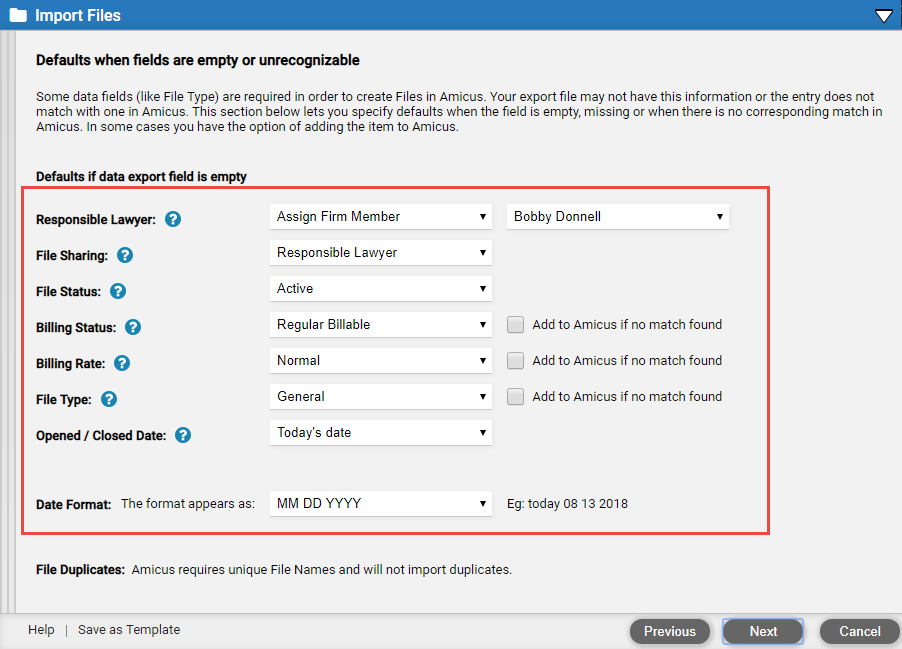
● Responsible lawyer – Firm member to be assigned if a file lacks this data. Or choose to not import the file in this case. Imported files are not necessarily shared with the Amicus administrator.
● Sharing – Who to share the file with if it lacks firm member/group sharing information—the file's "Responsible Lawyer" or a specified firm member/group.
● Status – Status to assign if a file lacks this data (e.g. "Active").
● Billing
status –
Status to assign if a file lacks this data (e.g. "Regular Billable").
If a file's billing status isn't defined in Amicus, choose whether it should
be added to the Amicus list and assigned to the file—otherwise the default
will be assigned.
● Billing
rate label –
Label to assign if a file lacks this data (e.g. "Normal").
If a file's billing rate label isn't defined in Amicus, choose whether
it should be added to the Amicus list and assigned to the file—otherwise
the default will beassigned.
● File
type –
Type to assign if a file lacks this data (e.g. "General").
If a file's file type isn't defined in Amicus, choose whether it should
be added to the Amicus list and assigned to the file—otherwise the default
will be assigned.
● Opened/closed date – Date to assign if a file lacks an opened date, or it is a closed file and lacks a closed date—"Today" or a particular other date.
● Date formatting – How dates are formatted in the data file (e.g. "MM/DD/YYYY").
Amicus Cloud (January 2023)
Copyright